A preserved archive of the Logical Gamers community forums, 2009-2025. The original threads and posts, served read-only. Registration, posting and private messages are gone for good.

CyanPort 2.0

3.5k views · started by Cyanoxide · · page 1 of 2
#1
CyanPort 2.0
Note: First post in Graphics ever :D

Over the time without LG I made a design for my new portfolio which can be reached at Cyanoxide.co.uk I am in the process actually this second working on the flash and actionscript of the new portfolio but I thought the mock design is work a post in here because it was entirely made in Photoshop and in my opinion it looks very professional.
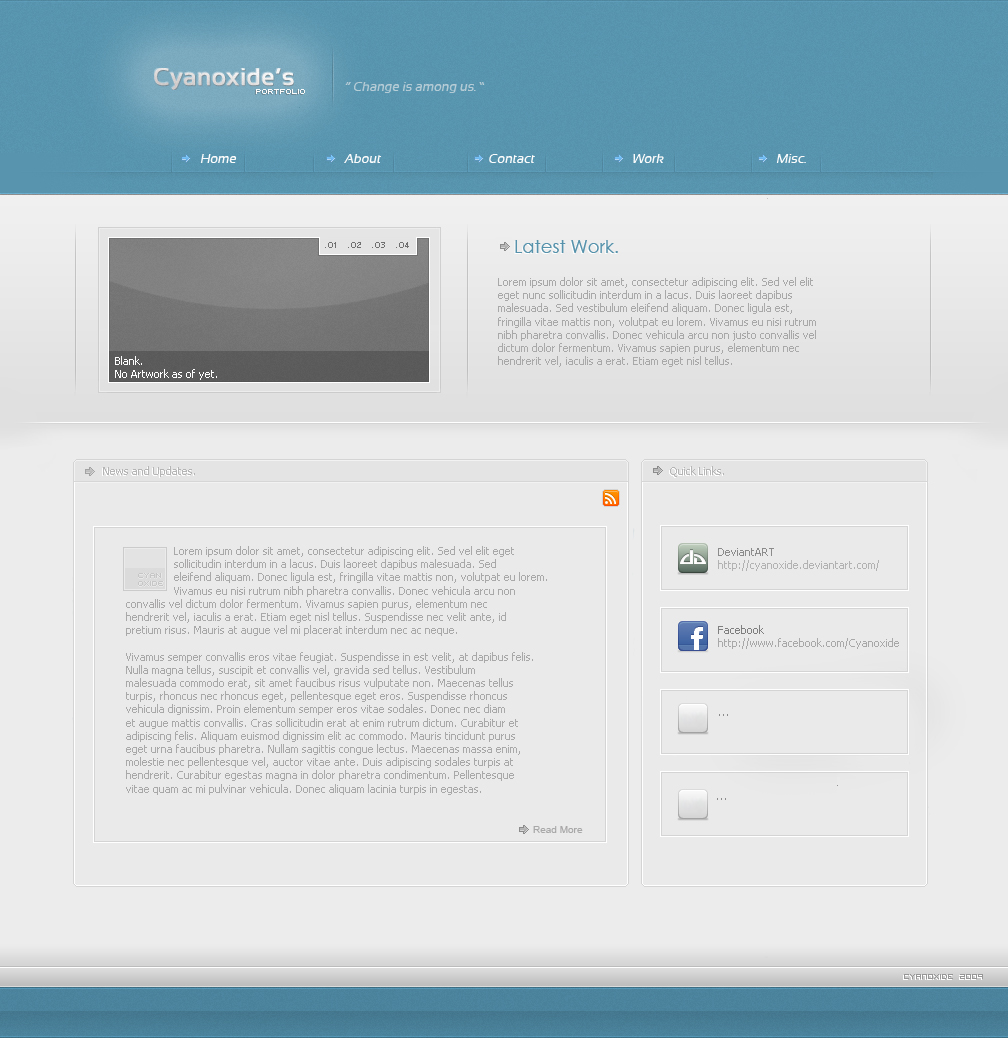


So yea, rate and criticise it, first full on web project so its not gonna be perfect. will post more on this project as I go.

Flash Prototype

http://cyanoxide.co.uk/Prototype/index.html
#2
Not bad. Better than the site im working on XD I focus on the internal programming while you focus more on looks. :P
#3
Sk8er wrote:
Not bad. Better than the site im working on XD I focus on the internal programming while you focus more on looks. :P


That sounds about right for me, It's not going to have to do much though so I don't have to worry much about the internal stuff.
#4
That looks hot. Good job. Try making some cool stuff for LG? Might help out, some time.
#5
Ahh. I like making things complicated. It just makes it more fun. lmao
#6
Sk8er wrote:
Ahh. I like making things complicated. It just makes it more fun. lmao


I obsessively make things look either ridiculously professional or epicly retarded, especially when it comes to flash.

@Chad, that's just the design, if the finished product looks anything like that then I defiantly will but don't hold your breath, I've never tried anything this complex.
#7
Do you have an MSN? I would like to talk to you about something.

Or we can do it via PM. Your choice.
#8
Chad wrote:
Do you have an MSN? I would like to talk to you about something.


Sure thing, I'll pm it you even though its rather obvious.

I'm also thinking about making a small flash movie about the rules of forums and LG in general.
#9
Oh. Flash rules for LG so noobs can scroll through them with ease and have a sense of "Oh this forum has a flash program for rules i like it. Makes me not feel like a noob."
#10
I though it would be something the people will actually enjoy reading through also I sent the pm.
#11
Nice and Simple 4/5 :D
#12
Great job, It passes by me with a 4.5

Its a 4.5 because you might want to change the grey text to something slightly darker. It might blend with the background on some older monitors.

But it is brilliant if you set aside the text. Good job!
#13
That looks very nice, Jamie.
#14
Very Very nice Jamie:D looks good ive seen it enough times in college ^^ and also helping you with some of the flashes :D
#15
Thank you, I got the ideas from Dioxyzone and Edumicro from deviant art.
#16
Simple, and easy on the eyes. 4.5/5
#17
looks great , keep the good work up cyano
#18
That is a nice site, and very smooth colors but, its a bit to clear, or light
#19
Really neat. I like the clean look of it and the glossy effect. I'm waiting forward to see the other pages.
#20
Cyanoxide. :P would you be up to begin creating tuts for LG on various aspects of design? Like an elite team of GFX designers? :p hahaha
#21
Plobby wrote:
Cyanoxide. :P would you be up to begin creating tuts for LG on various aspects of design? Like an elite team of GFX designers? :p hahaha


That would be awesome, I would love to do it.
#22
do it Jamie :D so i can see how to be pro! :D
#23
I added my flash prototype onto the end of this, I haven't made the high res version but It's pretty good in my opinion.

http://cyanoxide.co.uk/Pageflashcs3.html

Its a simple flash image gallery that also says a little bit about the piece you are looking at, there are four different images that are available by clicking the Next button and then back to go back obviously.
#24
Cyanoxide wrote:
I added my flash prototype onto the end of this, I haven't made the high res version but It's pretty good in my opinion.

http://cyanoxide.co.uk/Prototypeflash.swf

Its a simple flash image gallery that also says a little bit about the piece you are looking at, there are four different images that are available by clicking the Next button and then back to go back obviously.

Pretty nice but sure you need to do it high quality and add some motion to the slides :P. What version of AS did you use to make this ?
#25
Andrei wrote:
Pretty nice but sure you need to do it high quality and add some motion to the slides :P. What version of AS did you use to make this ?


I used Actionscript 2.0 on Flash CS4, I'm only just starting to get used to the program so I will get better as I go.
#26
Cyanoxide wrote:
I used Actionscript 2.0 on Flash CS4, I'm only just starting to get used to the program so I will get better as I go.

Yes that's true. It's been a long time since I used flash XD. Flash was actually the starting point for me to get in to the design world :D. Hmm you shouldn't stay on AS 2.0 too much because it will only get you difficulties if you want to learn AS 3.0 after. Start with it because it's 10x powerful and dynamic than the previous version. But if you want to finish your site in AS 2.0 than here is a tutorial for the gallery that may help you.
#27
Andrei wrote:
Yes that's true. It's been a long time since I used flash XD. Flash was actually the starting point for me to get in to the design world :D. Hmm you shouldn't stay on AS 2.0 too much because it will only get you difficulties if you want to learn AS 3.0 after. Start with it because it's 10x powerful and dynamic than the previous version. But if you want to finish your site in AS 2.0 than here is a tutorial for the gallery that may help you.


It's not that I want to stay using 2.0 its that 2.0 is the version we have to use at college.
#28
Cyanoxide wrote:
It's not that I want to stay using 2.0 its that 2.0 is the version we have to use at college.

Ahh now I understand. Well if that is so you can learn faster because you have qualified staff to help you and you'll be able to get on AS 3.0 also :).
#29
Thanks for the help. (:

One thing I am confused with at the moment is that all the images I import into or even paste into flash distort, is there a way to fix that?
#30
Hmmm try importing the psd project and maybe use .png and .gif format. I havent used flash for a while but that should do. If not I shall check tommorow and sort it out. No problem, it's a pleasure :).
#31
Looking Professional Dude :)
Once ya Flash is perfect your gonna have a hard time finding the problems in our prototyping :L <3
#32
I modified the Flash a bit, better quality and at the actual size rather than full screen.

Pageflashcs3
#33
Now it looks way better. Hmm how did you manage to keep the quality after all? Now you can add a nice motion slide so it wont look so rigid and try to make the gallery loading the images external from an XML file. That way you'll have a more dynamic site and easy to update it.
#34
Awesome layout mate!!

~Adam
#35
Andrei wrote:
Now it looks way better. Hmm how did you manage to keep the quality after all? Now you can add a nice motion slide so it wont look so rigid and try to make the gallery loading the images external from an XML file. That way you'll have a more dynamic site and easy to update it.


Feels kind of stupid now but I published it rather than Exporting it. Chenged the publish settings to high quality and actual pixels.

And I'm clueless about the XML lmao.
#36
Cyanoxide wrote:
Feels kind of stupid now but I published it rather than Exporting it. Chenged the publish settings to high quality and actual pixels.

And I'm clueless about the XML lmao.

Lol man dont worry! Shit happens xD. I once did a project for an important client and I saved it to 70dpi quality instead of 300 lol. It looked like hell and I had to start over xD. About xml its much more dynamic way to import things in flash. For example your gallery. You have the .swf published file, a folder with the images and the .xml file (similar to text files). In the your project file you code some lines in action script to import the links from the .xml file. The .xml file structure is simple. For example :
<xml>
<gallery>
<image></image>
<image></image>
</gallery>
</xml>

You can also tell flash to set proprieties like the speed the animation slides in the animation pattern that is used etc. I'll try and find some good tutorials for you.
#37
Andrei wrote:
Lol man dont worry! Shit happens xD. I once did a project for an important client and I saved it to 70dpi quality instead of 300 lol. It looked like hell and I had to start over xD. About xml its much more dynamic way to import things in flash. For example your gallery. You have the .swf published file, a folder with the images and the .xml file (similar to text files). In the your project file you code some lines in action script to import the links from the .xml file. The .xml file structure is simple. For example :
<xml>
<gallery>
<image></image>
<image></image>
</gallery>
</xml>

You can also tell flash to set proprieties like the speed the animation slides in the animation pattern that is used etc. I'll try and find some good tutorials for you.


Oh I know what you mean now and the tutorial would be awesome, thank you very much for all the help and support.

http://cyanoxide.co.uk/Prototype/Prototype.html

There's the test to see if it looks okay on the page. Though the page hasn't been made yet its just static images.
#38
Cyanoxide wrote:
Oh I know what you mean now and the tutorial would be awesome, thank you very much for all the help and support.

Untitled-1

There's the test to see if it looks okay on the page. Though the page hasn't been made yet its just static images.

No problem, I like helping people :). Hmm ok I'll point you some tutorials.
The basics of AS2.0 and XML
Doing an AS2.0 Slideshow using XML
Also here are some flash sites tutorials that might help you a lot :
Forum with resources and tutorials
Flash Blog Tutorial
Another flash tutorial Blog
I will search for more and if I find some more interesting I will tell you.
#39
Looks amazing. I love the colours. =)
#40
Now the flash is all done I've just got to work on the html, shouldn't take me that long.